Free Daycare Software in 2026: What You Actually Get
Free childcare software exists, but "free" means different things on different platforms. Some are free trials that expire. Others are genuinely free but limited in ways that matter. This guide breaks down what free plans actually include so you can decide if one is right for your center.
The Three Types of "Free" Childcare Software
When a childcare software platform says it is free, it usually falls into one of three categories. Understanding which type you are looking at is the first step to evaluating whether it will actually work for your center.
1. Free trial (time-limited)
Most platforms offer a 14-day or 30-day free trial where you get full access to all features. Once the trial ends, you must choose a paid plan or lose access. This is the most common type. It is useful for evaluating a platform, but it is not a long-term free solution.
2. Freemium (feature-limited)
Some platforms offer a permanently free tier with limited features. You can use the basic version forever, but core capabilities like billing, advanced reporting, or staff accounts may require a paid upgrade. This model is ideal for small providers who need only the basics.
3. Freemium (capacity-limited)
A few platforms offer a free tier with a limit on the number of children or users. You get access to most or all features but can only manage up to a certain enrollment size. This works well for home daycares and very small programs. Neztio's Starter plan falls into this category: free forever for up to 15 children with core features included.
What Free Plans Typically Include
Across the childcare software market, free plans generally include the basic operational tools that any center or home daycare needs to function day-to-day. Here is what you can expect:
Attendance tracking
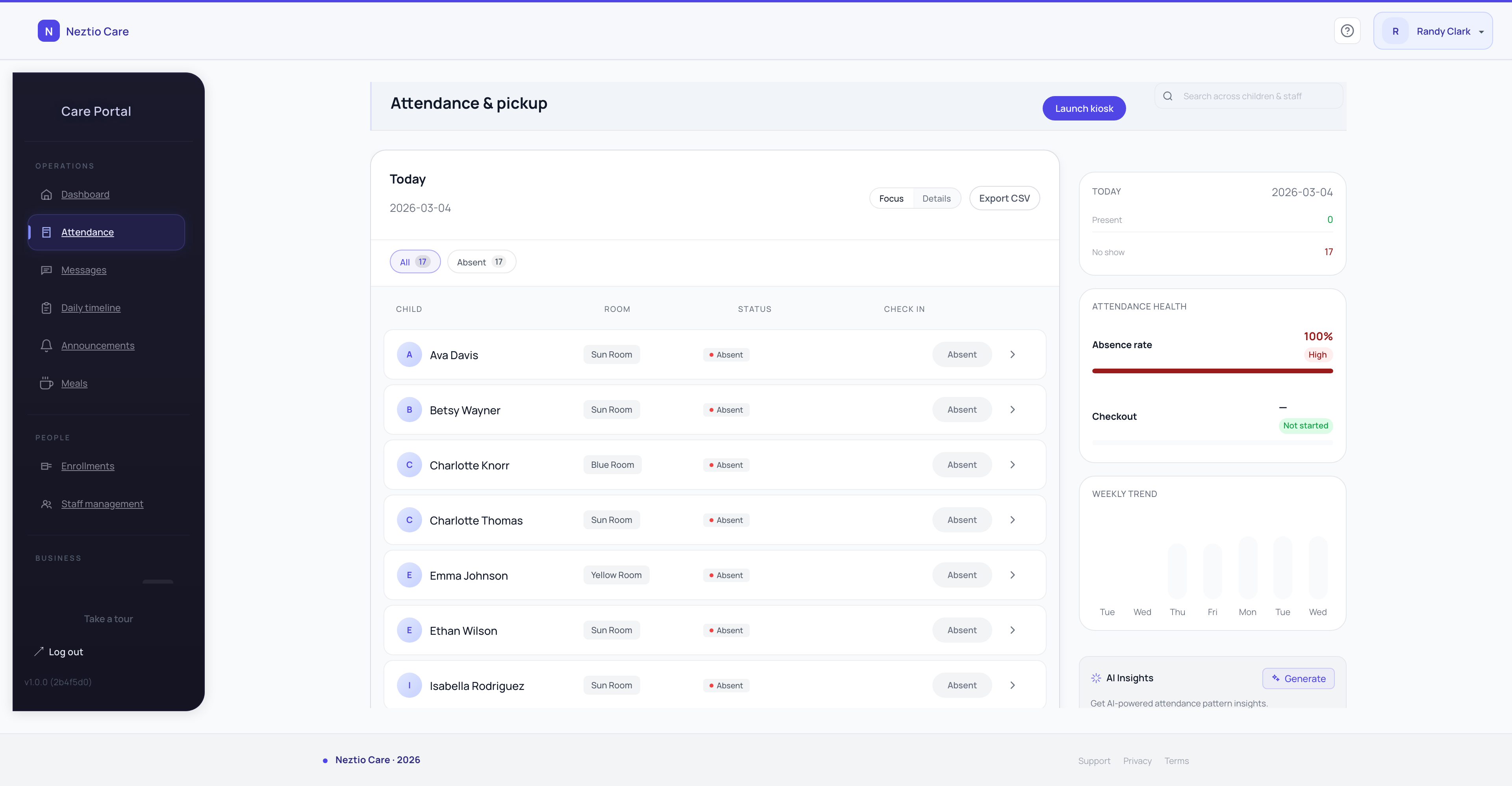
Basic check-in and check-out functionality to record which children are present each day. This meets the minimum licensing requirement for attendance records. More advanced features like QR code check-in may or may not be included.
Child roster management
A place to store child profiles, family contact information, and basic enrollment data. This replaces paper files and spreadsheets for managing your enrolled families.
Basic daily reports
Simple activity logging for meals, naps, diaper changes, and notes. Parents can see what happened during their child's day. The depth and customization of these reports varies by platform.
Parent communication
In-app messaging between staff and parents. This is a fundamental feature that most free tiers include because it keeps parents engaged and reduces the need for phone calls and texts.
What You Usually Need to Pay For
The features that free plans typically exclude are the ones that become essential as your center grows. Understanding this boundary helps you plan for when an upgrade will be necessary.
Billing and payment processing
Automated invoicing, online tuition payments, and late fee management are almost always paid features. If you need to collect payments through your software, expect to upgrade. For more on billing automation, see our billing automation guide.
Staff accounts and management
Free plans often limit you to one or two admin accounts. If you have multiple staff members who need their own logins with role-based permissions, that is typically a paid feature.
Advanced reporting and exports
Detailed attendance reports, financial summaries, and CSV exports are usually reserved for paid tiers. Free plans may show basic data but not let you export or customize reports for your licensing agency.
AI-powered features
Automated daily reports, smart messaging, and AI insights are premium features on platforms that offer them. Currently, Neztio is the only childcare platform with AI capabilities, and they are available on the Growth plan.
CACFP meal tracking
If your center participates in the CACFP food program, you need meal count tracking and claim generation tools. These are rarely included in free plans. See our CACFP software guide for what to look for.
Neztio Starter: What You Get for Free
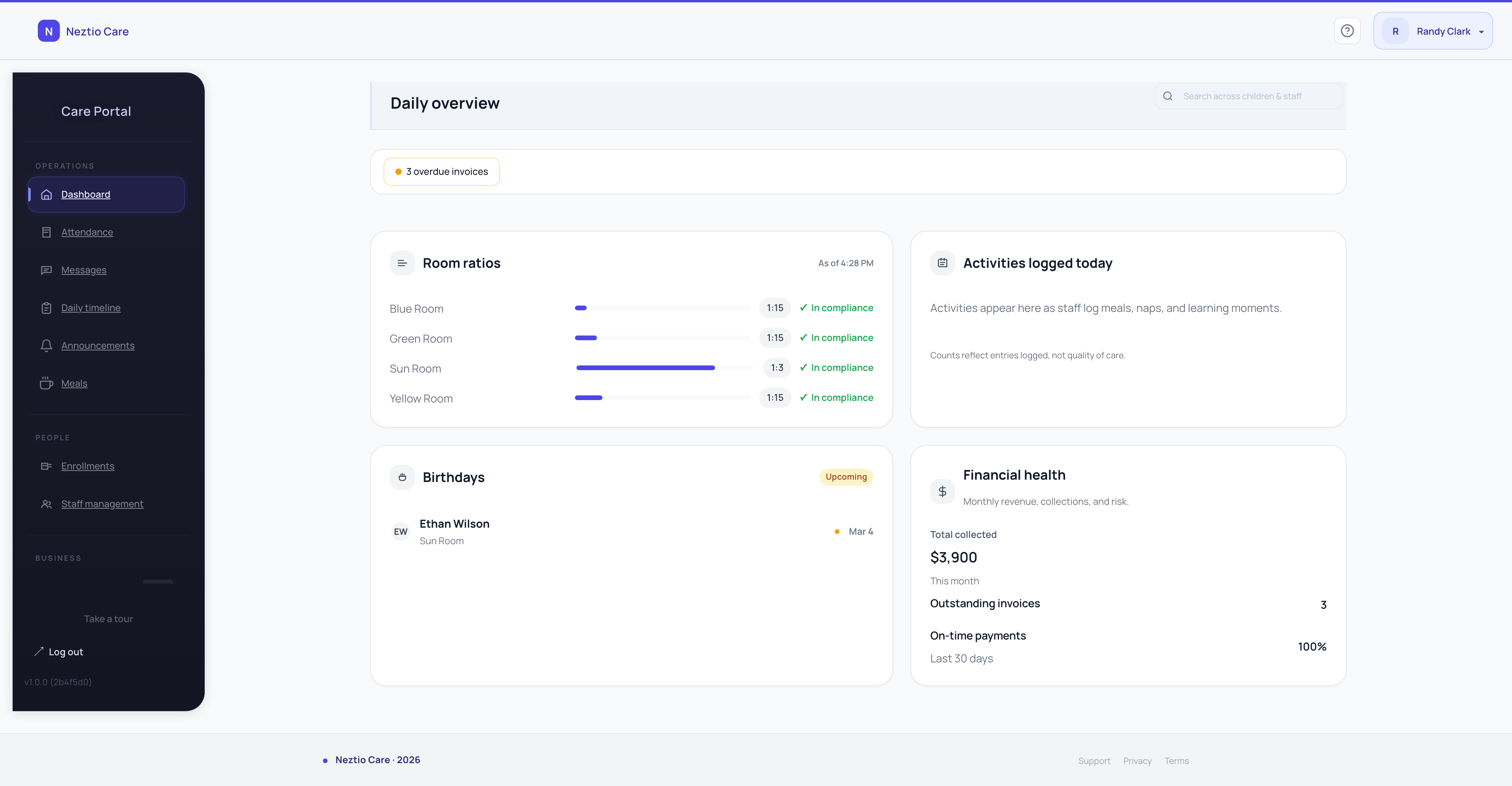
Neztio's Starter plan is free forever for programs with up to 15 children. It is not a trial. There is no credit card required and no time limit. Here is exactly what is included:
Attendance with QR check-in and check-out
Digital attendance tracking with QR code-based check-in for parents. Records exact arrival and departure times automatically.
Basic daily reports
Log meals, naps, diaper changes, and activities throughout the day. Parents see a daily timeline of their child's activities in the parent app.
Parent messaging
In-app messaging between your program and families. Keep all communication in one place instead of scattered across texts, emails, and phone calls.
Classroom management
Organize children into classrooms, manage daily schedules, and keep track of who is where throughout the day.
Child roster
Store child profiles with family contacts, emergency information, medical notes, and enrollment details in one secure place.
Parent app (iOS and Android)
Parents get a dedicated native app for check-in, viewing daily reports, sending messages, and receiving updates. Available on both iOS and Android.
Who is Starter best for?
Home daycares and small family childcare programs with up to 15 children. If you are just starting out or running a small program, Starter gives you professional-grade tools at no cost. When you grow beyond 15 children or need staff accounts, billing, or AI features, you can upgrade to a paid plan. See all plans.
Comparing Free Options Across Platforms
Here is how free offerings compare across the major childcare software platforms in 2026:
| Platform | Free Option | Type | Limitations |
|---|---|---|---|
| Neztio | Free forever | Capacity-limited | Up to 15 children, no billing or staff accounts |
| Brightwheel | Free trial only | Time-limited | Trial period, then paid subscription required |
| Procare | Free trial only | Time-limited | Trial period, then quote-based pricing |
| HiMama / Lillio | Free trial only | Time-limited | Trial period, then per-child pricing |
| Kangarootime | Free trial only | Time-limited | Trial period, then per-child pricing |
| Playground | Free trial only | Time-limited | Trial period, then per-child pricing |
When Does It Make Sense to Upgrade?
A free plan can serve a small program well for months or even years. But there are clear signals that it is time to consider a paid plan:
- 1
You hire staff who need their own accounts
When you bring on employees, they need their own logins with appropriate access levels. Lead teachers need different permissions than assistant teachers, who need different permissions than the director. Role-based access control is a paid feature on most platforms.
- 2
You need to collect payments digitally
Chasing paper checks and cash payments does not scale. Once you have more than a handful of families, automated invoicing and online payments save significant time and reduce late payments. This is the most common trigger for upgrading.
- 3
Your enrollment exceeds the free tier limit
If you grow beyond 15 children (Neztio's Starter limit), upgrading is straightforward. Your data stays in place, and you simply unlock additional capacity and features.
- 4
You need compliance reporting for licensing audits
Basic attendance logs may not be enough for your licensing agency. Paid plans typically include detailed attendance reports, ratio compliance reports, and exportable records that auditors require.
- 5
Administrative tasks are eating into teaching time
If you or your staff are spending hours on manual report writing, message drafting, and paperwork, AI-powered automation can reclaim that time. Neztio's Growth plan includes AI daily report cards, smart photo captions, and message rewriting that can save 5-10 hours per week.
Common Mistakes When Choosing Free Software
Here are the pitfalls to watch for when evaluating free childcare software options:
Confusing a free trial with a free plan
A 30-day trial gives you temporary access. A free plan is permanent. Make sure you understand which one you are signing up for. If the platform asks for a credit card at signup, it is likely a trial.
Ignoring the upgrade path
Before committing to a free plan, look at what the paid plans cost. You do not want to build your entire operation on a platform whose paid tiers are too expensive for your budget. Check the upgrade pricing before you start.
Using generic tools instead of childcare-specific software
Free generic tools like Google Sheets and WhatsApp groups can technically manage a small program, but they do not provide the structure, compliance tracking, or parent experience that purpose-built childcare software offers. The time you save with dedicated software usually outweighs the cost.
The Bottom Line
Free daycare software is a real option for small programs, especially home daycares with fewer than 15 children. The key is choosing a platform with a genuinely free tier (not just a trial) and a reasonable upgrade path for when you grow.
Neztio Starter is free forever with attendance, daily reports, parent messaging, classroom management, and a native parent app for up to 15 children. No credit card, no time limit. Get started free or compare all plans.
Related
Best Daycare Management Software in 2026
Related
How to Start a Daycare: A Complete Step-by-Step Guide
Glossary terms in this article
Childcare Management Software
An integrated platform that handles enrollment, billing, attendance, communication, and reporting for childcare programs.
Attendance Tracking
Recording children's daily attendance at a childcare facility, required for licensing, billing, and CACFP claims.
Parent Communication
The systems and practices childcare programs use to keep families informed about their child's care and development.
Enrollment
The process of registering a child in a childcare program, including collecting required documents and family information.