Staff Credential Tracking: Never Miss a License Renewal Again
Expired CPR certifications, lapsed background checks, and overdue training hours are some of the most common licensing violations at childcare centers. Here is how to build a credential tracking system that keeps your staff compliant and your center inspection-ready.
What Credentials Do Childcare Workers Need?
Every state sets its own requirements for childcare staff qualifications, but there is a common baseline that applies nearly everywhere. Before a teacher steps into a classroom, they typically need the following credentials on file:
| Credential | Typical Renewal Cycle | Notes |
|---|---|---|
| Pediatric CPR | Every 2 years | Most states require at least one CPR-certified adult per classroom at all times |
| First Aid | Every 2 years | Often paired with CPR certification; some states require both for all staff |
| Background check | Every 5 years (varies) | FBI fingerprint, state criminal history, sex offender registry; required for all staff and volunteers |
| CDA (Child Development Associate) | Every 3 years | The most recognized ECE credential; renewal requires 45 hours of continuing education |
| Annual training hours | Annually | Most states require 15-24 hours per year covering topics like child abuse recognition, health and safety, and developmentally appropriate practice |
| Health screening / TB test | At hire (some states annually) | Physical exam or health statement confirming the staff member is fit to work with children |
Some states add additional requirements. For example, Texas requires Safe Sleep training for all infant room staff. California requires a Mandated Reporter training certificate. Check your state's licensing agency for the complete list, or browse our licensing checklist for a general overview.
The Cost of Expired Credentials
When a staff member's credential expires, the consequences ripple outward. At best, it is an administrative headache. At worst, it can jeopardize your license.
Licensing violations
If a licensing inspector finds that a staff member has an expired CPR certification or an overdue background check, it is recorded as a violation. Repeated violations can lead to provisional licensing status, fines, or in severe cases, closure.
Financial penalties
Some states impose fines for credential-related violations. Even where fines are not automatic, the cost of emergency recertification classes and expedited background checks adds up quickly.
Staffing disruptions
If a staff member cannot work until their credential is renewed, you lose a classroom worker. That can force you to pull teachers from other rooms, combine classrooms, or close a room entirely until coverage is restored.
Parent trust
Licensing violations are public record in most states. Parents can and do look up inspection reports. A violation related to staff credentials, especially background checks, can seriously damage the trust that families place in your center.
Real scenario
A director in Ohio discovered during a surprise inspection that three staff members had CPR certifications that expired two months earlier. Nobody noticed because the paper copies in the filing cabinet were never checked. The center received three separate violations, triggered a follow-up inspection within 30 days, and had to pay for expedited recertification for all three teachers.
How Credential Tracking Software Works
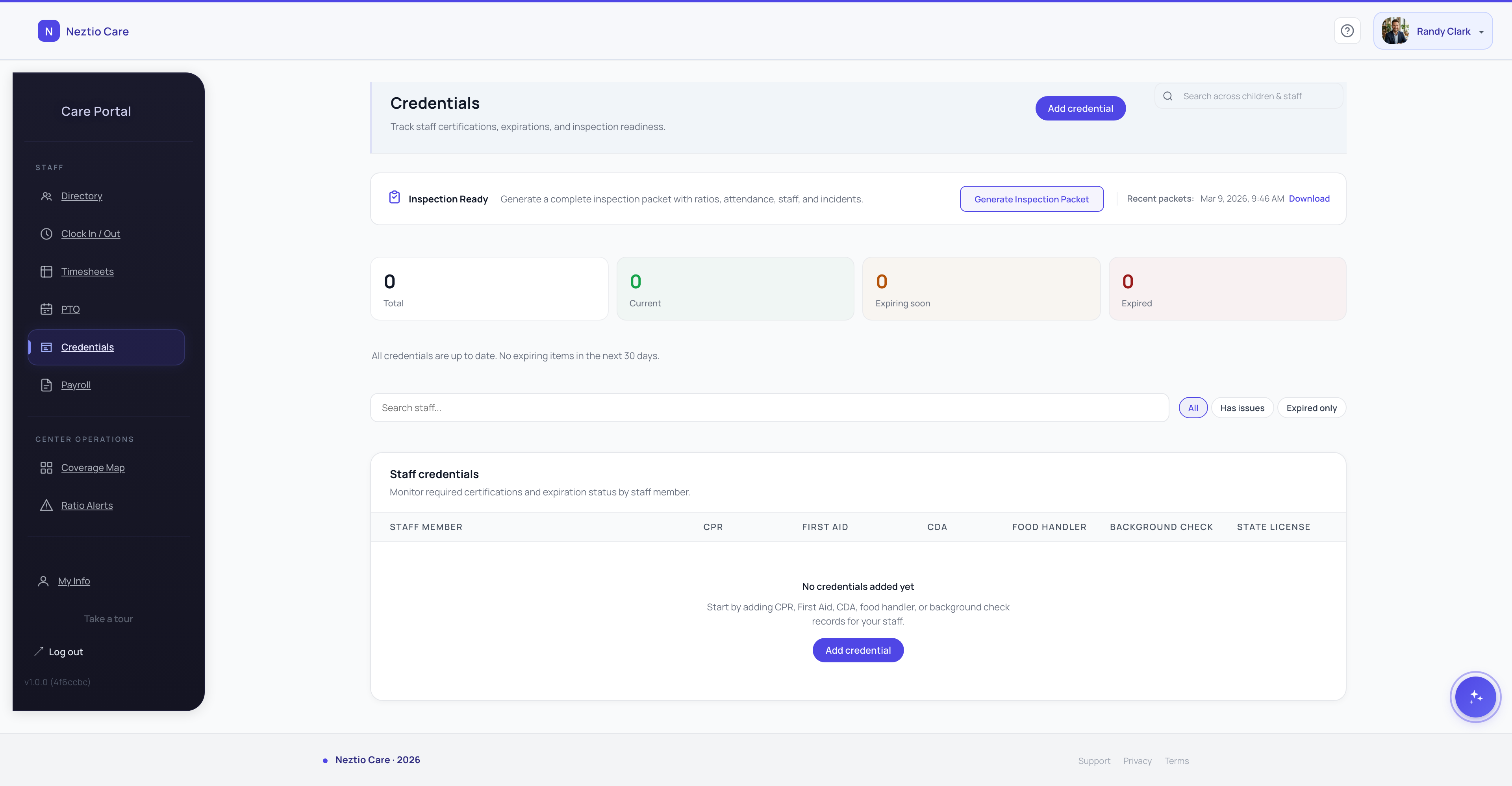
Digital credential tracking replaces the filing cabinet with a centralized system where every credential for every staff member is stored, monitored, and flagged when renewal is due. Here is the typical workflow:
- 1
Upload credential documents
Scan or photograph each certificate, card, or clearance letter and upload it to the staff member's profile. The document is stored digitally and accessible from any device. No more digging through filing cabinets.
- 2
Set issue and expiration dates
For each credential, enter when it was issued and when it expires. The system uses these dates to calculate the renewal timeline and trigger alerts at the right time.
- 3
Automated renewal alerts
The system sends reminders well before expiration. A typical setup sends alerts at 90 days, 60 days, and 30 days out. Both the staff member and the director receive notifications so everyone is aware.
- 4
Dashboard view of team compliance
A single dashboard shows the compliance status of every staff member: green for current, yellow for expiring soon, red for expired. The director can see at a glance who needs attention.
Preparing for Licensing Inspections
Licensing inspections can be announced or unannounced depending on your state. Either way, having your credential records organized and up to date makes the inspection process dramatically smoother. Inspectors commonly ask to see:
Current CPR and First Aid cards for each staff member on duty
The inspector will cross-reference who is in the building with your credential records. If someone on the floor has an expired certification, that is an immediate finding.
Background check clearance documentation
Every person who has unsupervised access to children must have a current background check on file. This includes not just teachers but also kitchen staff, janitors, and regular volunteers.
Annual training hour records
Inspectors want to see that each staff member has completed the required number of training hours for the current year. Having a digital log with dates, topics, and completion records makes this review quick.
Health screenings and TB test results
Some states require annual health statements. Others only require documentation at hire. Know your state's requirements and keep the records current.
Pro tip
Run a “mock inspection” quarterly. Pull up your credential dashboard, pretend an inspector is asking for documentation, and see how quickly you can produce every required document. If it takes more than five minutes, your system needs work. With digital credential tracking, it should take seconds.
Building a Credential Management Process
Technology is only half the solution. You also need a clear process that makes credential management part of your center's culture. Here are the steps that work:
Start at onboarding
Before a new hire's first day, collect and upload all required credentials. Make it a condition of employment that documentation is complete before they enter a classroom. This sets the expectation from day one.
Assign renewal responsibility
Make it clear that staff are responsible for renewing their own credentials on time. The center's job is to remind them and track status. The staff member's job is to complete the renewal and provide updated documentation.
Budget for renewals
CPR recertification classes cost $50 to $100 per person. CDA renewal fees are around $150. Background checks can be $50 to $100. Budget for these expenses annually so renewals are never delayed by cost. Many centers cover these costs as a retention benefit. Learn more about supporting staff professional development.
Review monthly
Add a credential review to your monthly administrative checklist. Spend five minutes checking your dashboard for any yellow or red flags. Address expiring credentials before they become expired credentials.
The Bottom Line
Credential management is one of those tasks that seems minor until an inspection reveals a gap. By the time you discover an expired certification, the violation has already occurred. The only real solution is a proactive system that tracks every credential, alerts you before expirations, and gives you instant access to documentation when an inspector walks through your door.
Ready to stop worrying about expired credentials? See how Neztio's credential tracking keeps your team compliant and inspection-ready.
Related
Childcare Staff Management: Hiring, Scheduling, and Retention
Related
Childcare Licensing Checklist: What Every New Center Needs
Glossary terms in this article
Licensing
State-issued permission to operate a childcare facility, requiring compliance with health, safety, and staffing standards.
Lead Teacher
The primary educator responsible for a classroom, typically holding a CDA or degree in early childhood education.
Staff-to-Child Ratio
The number of caregivers required per group of children, set by state licensing regulations based on age.
Group Size
The maximum number of children allowed in a single classroom or care group, regulated by state licensing.