How to Automate Billing at Your Childcare Center
Billing is the most time-consuming administrative task at most childcare centers. Directors spend hours every month creating invoices, chasing late payments, and reconciling accounts. Most of this work can be automated. Here is how.
Quick Answer
Automate childcare billing by setting up tuition plans, enabling auto-generated invoices on a recurring schedule, and offering online payment through your childcare management software. This eliminates manual invoicing, reduces late payments by up to 60%, and saves directors 5+ hours per week on billing tasks.
1. The real cost of manual billing
Before talking about automation, it helps to understand what manual billing actually costs you. Not just in time, but in revenue and relationship quality.
Time
Creating individual invoices, tracking who has paid, and following up on late payments takes 8-15 hours per month at a typical 50-child center.
Lost revenue
When billing is manual, late payments slip through the cracks. Centers using manual processes report 15-25% of families paying late in any given month.
Awkward conversations
Nobody enjoys asking a parent about an overdue payment in front of their child at morning drop-off. Manual billing forces these interactions.
Errors
Manual calculations lead to incorrect invoices. Undercharging costs you money. Overcharging damages trust.
2. How automated billing works
Automated childcare billing has three layers. Each one eliminates a category of manual work.
- 1
Tuition plans
You define your programs and pricing once: Infants full-time at $1,400/month, Toddlers three-day at $950/month, and so on. Each child is assigned to a plan. The system knows what every family owes without you calculating anything.
- 2
Automatic invoice generation
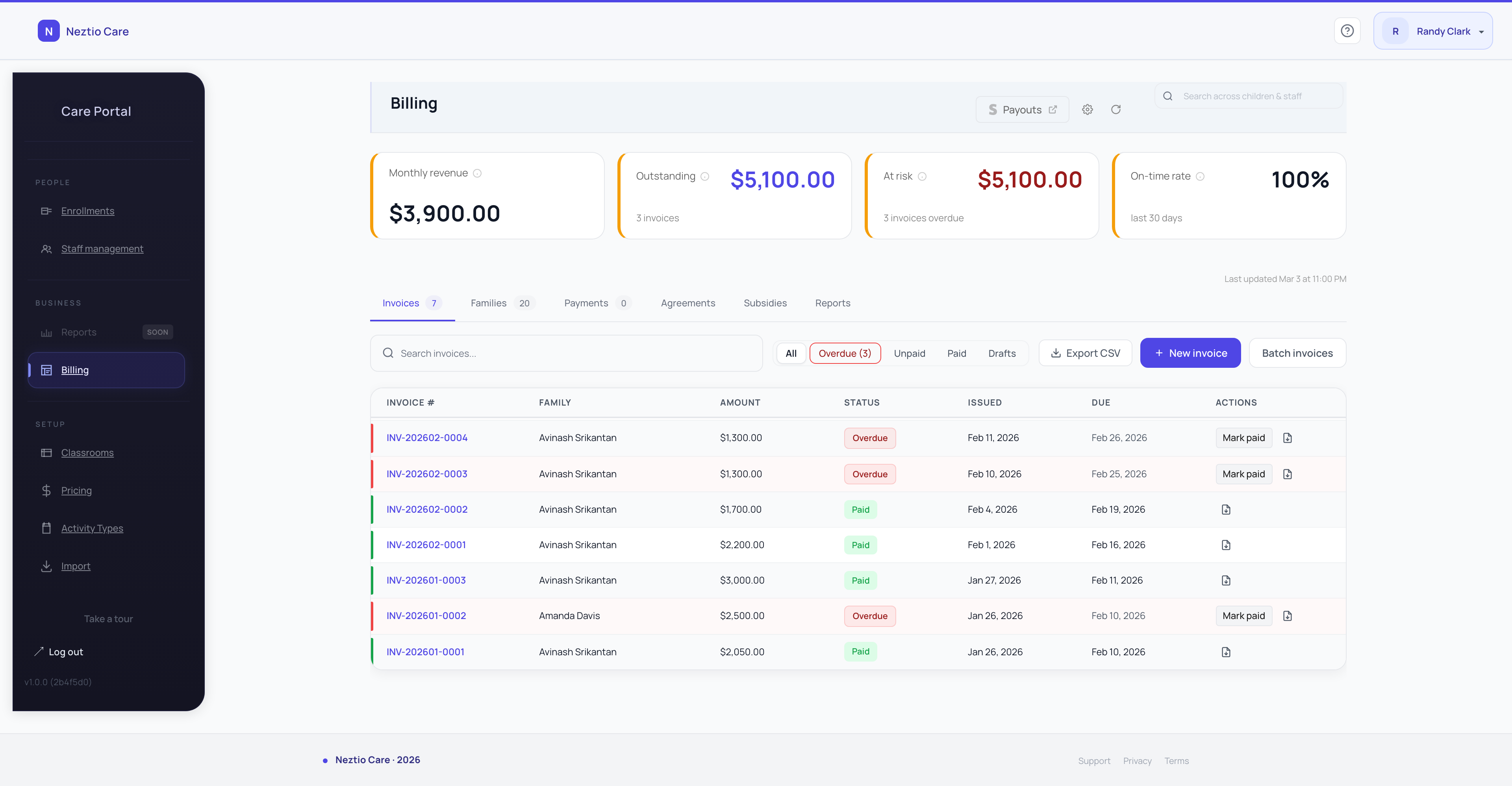
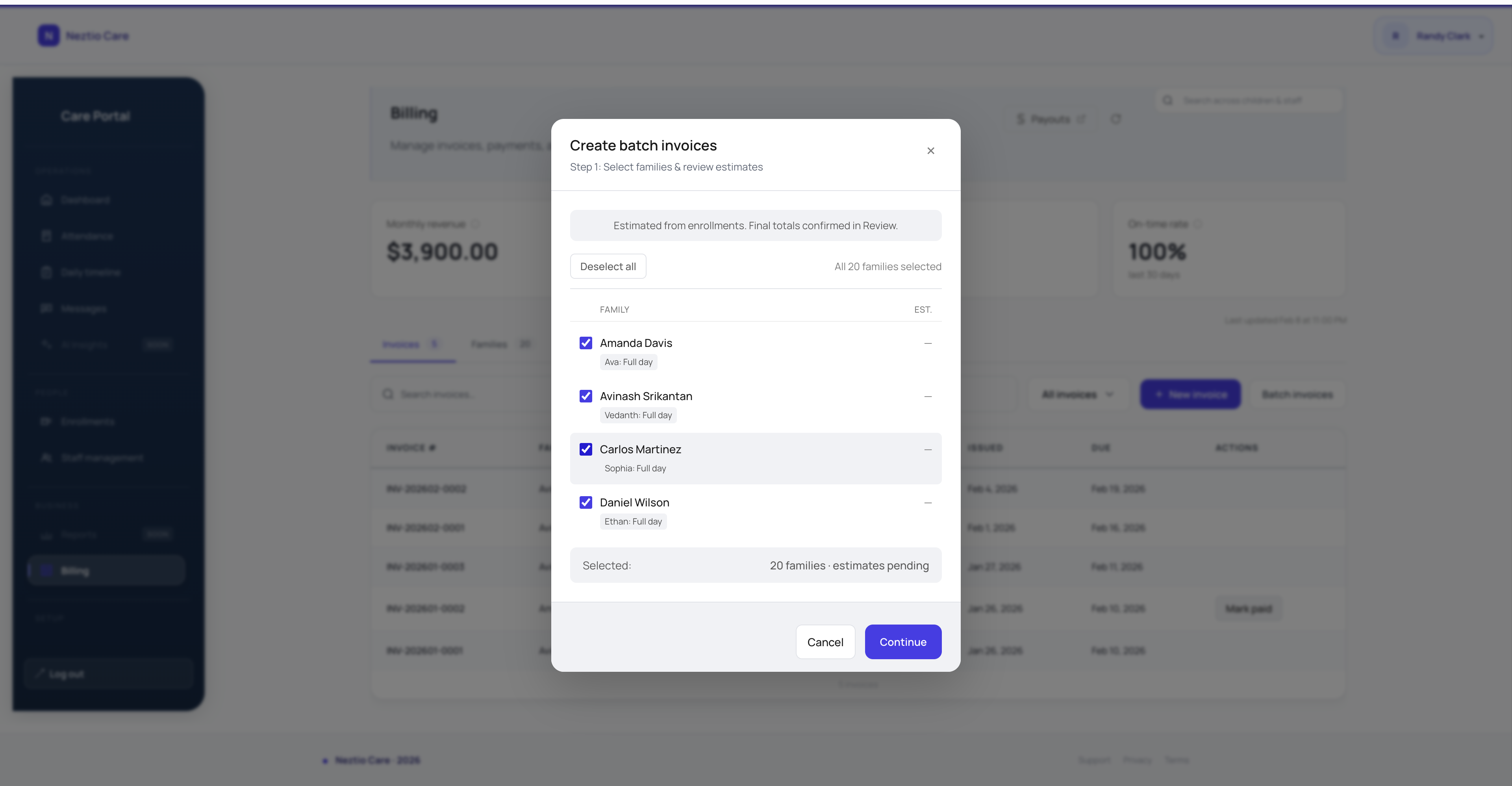
On the first of each month (or whatever schedule you choose), the system generates invoices for every enrolled family. Discounts, sibling rates, and prorations are applied automatically. You review and approve, or let them go out on their own.
- 3
Online payment collection
Parents receive their invoice in the parent app or via email. They pay with a credit card or bank transfer. The payment is recorded automatically. No checks to deposit, no cash to track, no manual reconciliation.
Result
Centers that automate billing typically reduce billing-related admin work by 80% and see on-time payment rates improve by 30-40%.
Learn more about how billing automation works in our glossary, or explore Neztio's billing features to see it in action.
3. Handling the hard parts
Billing is never perfectly simple. Children enroll mid-month. Families take vacations. Discounts vary. A good billing system handles these edge cases without manual intervention.
Prorated enrollment
When a child starts on the 15th, the system should automatically calculate a half-month invoice. You should not be doing this math by hand.
Sibling discounts
Define a discount rule once (e.g., 10% off for second child) and the system applies it automatically whenever two or more children from the same family are enrolled.
Late fees
Set your late fee policy in the system. After the due date passes, the fee is applied automatically. No uncomfortable conversations. The policy is clear and consistent.
Schedule changes
When a family changes from five days to three days per week, update their plan and future invoices adjust automatically. No need to remember to change the amount next month.
4. What to look for in a billing system
If you are evaluating childcare software specifically for billing, these are the capabilities that separate functional systems from frustrating ones:
Flexible tuition plans
Support for multiple programs, schedules, and pricing tiers. Not just one flat rate per age group.
Automatic invoice generation
Invoices should be created and sent without you clicking a button each month.
Online payments
Credit card and ACH/bank transfer support. Parents should pay from their phone in under 30 seconds.
Payment tracking dashboard
At a glance: who has paid, who is overdue, how much outstanding revenue exists.
Parent-facing invoice history
Parents should see their full payment history in the app. This eliminates "I already paid" disputes.
Tax-ready reporting
Year-end tuition summaries for families filing childcare tax credits. Parents will ask for this every January.
5. Payment processing fees
Online payments come with processing fees. This is unavoidable. The question is how the fees are handled and whether they are reasonable.
Standard credit card rates (2.9% + 30 cents)
This is the industry standard for Stripe-powered platforms. On a $1,200 tuition payment, the fee is about $35.
ACH/bank transfer (lower fees)
Many platforms offer bank transfer at 0.8% or a flat fee. On $1,200 that is under $10. Encourage parents to use ACH when possible.
Platforms that add markup on top of Stripe
Some childcare platforms charge 3.5% or more by adding their own margin to the standard processing rate. Ask what the actual rate is.
Do the math
For a center collecting $50,000/month in tuition, the difference between 2.9% and 3.5% processing is $300/month, or $3,600/year. That is meaningful.
For guidance on setting competitive tuition rates, see our guide to childcare tuition pricing. And if your center serves families receiving government assistance, our childcare subsidy guide explains how to manage subsidy payments alongside private-pay billing.
6. Making the switch
Transitioning from manual billing to automated billing does not have to be disruptive. Here is a practical approach:
Set up your tuition plans in the system (1-2 hours for a typical center)
Assign each enrolled child to their plan
Run a test invoice cycle before going live - review every invoice for accuracy
Notify parents about the new payment system with clear instructions
Send the first real invoices and monitor payment rates
After the first month, review and adjust any plans that need fine-tuning
Most centers are fully transitioned within one billing cycle. The first month requires attention, but from month two onward billing essentially runs itself.
The bottom line
Manual billing costs you time, money, and parent goodwill every single month. Automated billing is not a nice-to-have - it is the single highest-ROI improvement most centers can make.
Neztio includes automated invoicing, online payments via Stripe, tuition plan management, and parent-facing payment history. Start a free 30-day trial and run a test billing cycle with your real data.
Glossary terms in this article
Billing Automation
Software features that automatically generate invoices, process payments, and track tuition for childcare programs.
Tuition
The recurring fee families pay for childcare services, typically charged weekly, biweekly, or monthly.
Enrollment
The process of registering a child in a childcare program, including collecting required documents and family information.
Subsidy
Government financial assistance that helps eligible families pay for childcare, funded through programs like CCDF.