Digital Attendance Tracking for Daycare Centers: A Complete Guide
Paper sign-in sheets are a liability. They get lost, they are hard to audit, and they tell you nothing in real time. This guide covers how digital attendance tracking works, what to look for in a system, and how to make the switch without disrupting your center.
Quick Answer
Replace paper sign-in sheets with a digital attendance system that records exact check-in/check-out times, monitors staff-to-child ratios in real time, and generates the compliance reports your licensing agency requires. Digital tracking eliminates errors, saves 30+ minutes of staff time per day, and keeps your center audit-ready.
1. Why paper sign-in sheets are a problem
Every state requires childcare centers to maintain accurate attendance records. Most licensing inspectors expect to see who was in the building, when they arrived, and when they left. Paper sign-in sheets technically satisfy this requirement, but they create real operational problems.
Parents forget to sign in or out, leaving gaps in your records
Handwriting is often illegible, making audits difficult
You cannot see who is in the building right now without walking room to room
No way to calculate real-time staff-to-child ratios across classrooms
Sheets get coffee-stained, lost, or accidentally thrown away
End-of-month billing requires manually counting attendance days
The core issue is that paper gives you a record of the past. Digital attendance gives you a picture of the present.
Accurate attendance is also essential for maintaining staff-to-child ratios, which are a core licensing requirement in every state. Our attendance tracking glossary entry explains the full scope of what this involves.
2. How digital check-in works
Modern childcare platforms offer several check-in methods. The right one depends on your center's layout and parent preferences.
QR code check-in
Parents scan a QR code displayed at your entrance using their phone. The system logs arrival time, identifies the child, and updates classroom counts instantly. No hardware required beyond a printed QR code or a tablet displaying one.
Kiosk mode
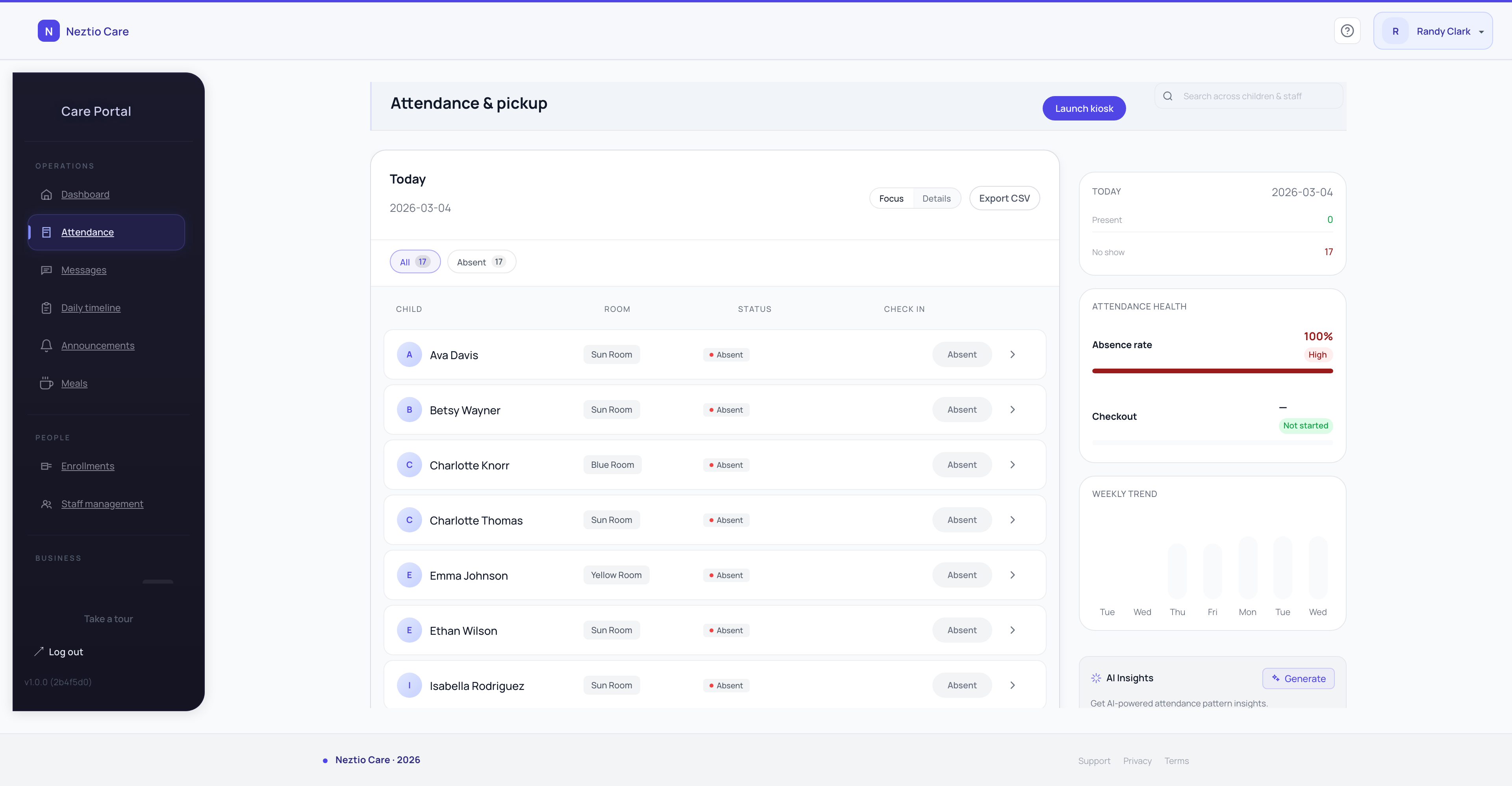
A tablet mounted at the front desk runs as a dedicated check-in station. Parents tap their child's name, confirm arrival, and the record is created. Works well for centers where parents prefer not to use their phones.
Staff-initiated check-in
A teacher marks a child as present from their classroom view. Useful for programs where parents drop off at the door and staff bring children inside.
Best practice
Offer at least two check-in methods. QR code as the primary option, with staff-initiated check-in as a fallback. This covers every scenario without adding complexity.
3. Real-time ratio monitoring
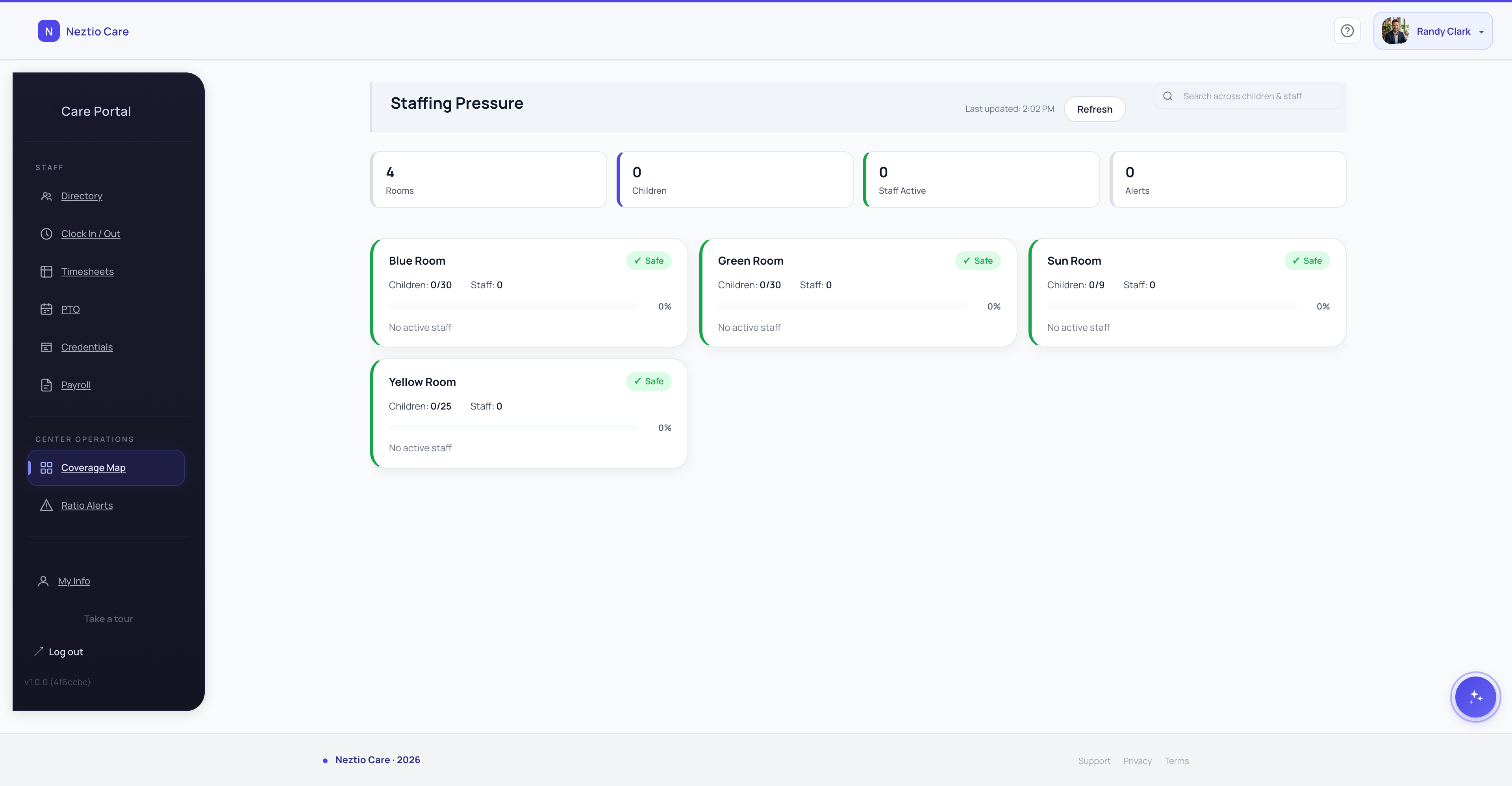
This is the most undervalued benefit of digital attendance. When check-ins and check-outs happen in real time, the system always knows how many children are in each classroom. Combined with staff assignments, you get live ratio visibility.
Why this matters: state licensing sets maximum staff-to-child ratios by age group. Violations can result in citations, fines, or loss of licensure. With paper records, you discover ratio problems after the fact. With digital tracking, you see them before they happen.
See ratios across all classrooms on one dashboard
Get alerts when a classroom approaches its ratio limit
Track historical ratio compliance for licensing audits
Make informed decisions about room transitions and staff breaks
4. What to look for in an attendance system
Not all digital attendance systems are equal. Some are glorified spreadsheets with a tablet interface. Others are built for how childcare centers actually operate.
Instant updates
When a child checks in, every screen in the building should update within seconds. Batch processing or manual syncing defeats the purpose.
Parent-facing timestamps
Parents should see exactly when their child was checked in and out, in the parent app. This builds trust and reduces disputes.
Absence reporting
Parents should be able to report an absence from their phone. Staff should see reported absences on the dashboard before the morning starts.
Pickup authorization
The system should track who is authorized to pick up each child. When someone other than a parent arrives, staff need this information immediately.
Billing integration
Attendance data should flow directly into billing. If you are still manually counting days for invoicing, your attendance system is incomplete.
Offline fallback
The system should handle brief internet outages gracefully. Children do not stop arriving because your Wi-Fi went down.
5. How to switch from paper to digital
The transition is simpler than most directors expect. Here is a realistic timeline:
- 1
Week 1: Set up your classrooms and children
Most platforms let you import from a spreadsheet. Add your rooms, age groups, and enrolled children. This takes an hour, not a day.
- 2
Week 1-2: Run both systems in parallel
Keep your paper sign-in sheet at the door but also check children in digitally. This lets staff build the habit without pressure.
- 3
Week 2: Notify parents about the parent app
Send a simple email or text explaining the new check-in process. Include download links for the parent app. Most parents set it up in under two minutes.
- 4
Week 3: Remove the paper sheet
By now, 80-90% of parents will be using digital check-in. For the remaining holdouts, staff can check in children on their behalf.
Common concern
"What about parents who are not tech-savvy?" In practice, this is rarely an issue. If a parent can use text messaging, they can use a QR code. For the rare exception, staff can handle check-in on their behalf.
6. Compliance and reporting
Digital attendance records are easier to audit than paper. Every check-in is timestamped, attributed to a specific person, and stored permanently. When a licensing inspector asks for attendance records from six months ago, you pull them up in seconds instead of digging through filing cabinets.
Most states accept digital records as long as they include the same information as paper: child name, date, arrival time, departure time, and the person who checked the child in and out. Some states explicitly encourage digital systems because they are more reliable.
Tip
Check your state's licensing requirements before choosing a system. Some states require specific data points (like authorized pickup lists or allergy alerts on check-in) that not every platform supports.
See how Neztio's attendance and check-in features work, or use our ratio calculator to determine the staffing you need based on your enrollment numbers.
The bottom line
Digital attendance tracking is not a luxury. It is a baseline requirement for running a safe, compliant, and efficient childcare center. The operational benefits - real-time ratios, automated billing integration, instant audit trails - compound every day.
If you are still using paper, try Neztio free for 30 days. QR check-in, kiosk mode, ratio monitoring, and parent absence reporting are all included from day one.
Glossary terms in this article
Attendance Tracking
Recording children's daily attendance at a childcare facility, required for licensing, billing, and CACFP claims.
Check-In / Check-Out
The process of recording a child's arrival and departure times at a childcare facility.
Staff-to-Child Ratio
The number of caregivers required per group of children, set by state licensing regulations based on age.
Licensing
State-issued permission to operate a childcare facility, requiring compliance with health, safety, and staffing standards.